A good home office desktop should disappear into your routine. It should wake quickly, handle video calls smoothly, keep dozens of browser tabs open, and drive the monitors you use. In 2026, the best desktop computer for a home office is not automatically the most powerful machine. It is the one that matches your software, workspace, upgrade plans, and daily workload without making you pay for performance you will never use.
Remote and hybrid workers can choose from palm-sized mini PCs, expandable towers, and polished all-in-one systems. The options below cover everyday productivity, business administration, creative work, and demanding multitasking.
What to Look for in a Home Office Desktop
For general office work, 16GB of memory is the practical starting point. It gives a home office PC enough room for Microsoft 365, cloud apps, Zoom or Teams, browser tabs, and light photo editing. Users working with large spreadsheets, development tools, virtual machines, or creative applications should consider 32GB.
A 512GB solid-state drive is a sensible minimum for most people. Smaller drives can work when nearly everything lives in cloud storage, but they fill quickly once applications, downloads, recordings, and local backups accumulate. Check the display outputs before buying, too. A desktop for remote work should support your intended monitor setup without requiring multiple adapters.
Windows buyers should choose a system designed for Windows 11. Standard Windows 10 support ended in October 2025, so older bargain desktops that cannot upgrade may create security and compatibility problems.
Best Desktop Computers for Home Office Use in 2026
Apple Mac mini with M4: Best Compact Desktop for Mac Users
The M4 Mac mini is easy to recommend when you prefer macOS. It is exceptionally compact, quiet during normal office work, and powerful enough for writing, research, accounting, coding, design, and moderate video production. The standard M4 model includes a 10-core CPU and 10-core GPU, while the M4 Pro version suits heavier creative or technical workloads.
The M4 Mac mini can support up to three displays, making it a strong choice for productivity-focused setups. The main drawback is that the price does not include a monitor, keyboard, or mouse. Storage upgrades can also be expensive, so choose capacity carefully or plan to use a fast external drive.
Dell Pro 5 Micro: Best Windows Mini PC for Business Work
The Dell Pro 5 Micro is a strong business desktop computer for workers who want a clean desk without giving up professional features. Current configurations use Intel Core Ultra Series 3 processors and offer Windows 11 Pro, DDR5 memory, Wi-Fi 7, and compact mounting options. It can sit on a desk, mount behind a compatible monitor, or fit under a work surface.
This model is particularly appealing for consultants, managers, finance professionals, and small-business users who value security, manageability, and support. A configuration with 16GB of RAM and a 512GB SSD suits mainstream remote work, while demanding users should move to 32GB. Compare the processor, memory, storage, wireless card, and warranty rather than judging it by the lowest advertised price.
HP Elite Mini 800 G9: Best for Security-Conscious Offices
The HP Elite Mini 800 G9 remains a practical choice for people handling client records, financial documents, or other sensitive information from home. Available configurations include Windows 11 Pro, Intel Core i5 or Core i7 processors, DDR5 memory, and NVMe storage. Some packages also include extended warranty coverage and HP Wolf Pro Security.
Its small footprint makes it easy to build a tidy dual-monitor workstation, while the business-focused design provides more service and support options than many consumer mini PCs. It is not the cheapest route to basic computing, but the premium can make sense when reliability, security tools, and warranty response matter more than gaming performance.
Lenovo ThinkCentre M70t Gen 6: Best Expandable Tower
Mini desktops are convenient, but a tower is smarter when you expect your needs to grow. The Lenovo ThinkCentre M70t Gen 6 combines modern Intel Core Ultra processors with accessible memory and storage options. Higher configurations can include 32GB of DDR5 memory, a 1TB SSD, support for multiple monitors, and optional discrete NVIDIA graphics.
This is a good fit for analysts working with large datasets, creators using graphics applications, developers running demanding tools, or anyone who wants easier upgrades. It takes more space than a mini PC, but it is more flexible and generally easier to repair. For a long-term home office setup, that expandability can be more valuable than having the smallest computer.
24-Inch iMac with M4: Best All-in-One Desktop
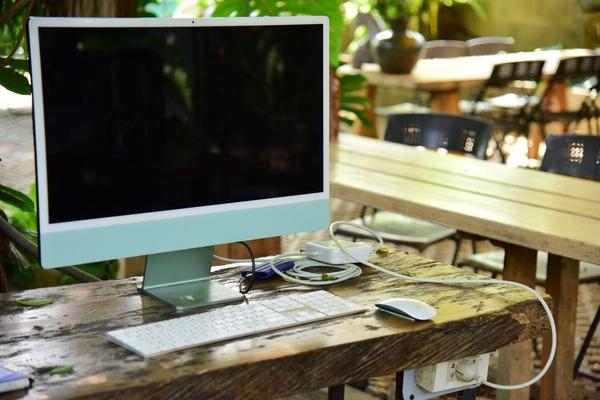
The 24-inch M4 iMac is the most streamlined option here. The computer, 4.5K Retina display, speakers, microphones, and 12MP Center Stage camera are integrated into one thin design. That reduces cable clutter and creates a polished setup for video meetings, writing, administration, and creative work.
The display is sharp, bright, and suited to long working sessions. However, an all-in-one is less flexible than a separate desktop and monitor. You cannot replace only the computer while keeping the display, and internal upgrades are limited. It is best for users who value simplicity and visual quality more than future expansion.
Which Configuration Should You Buy?
For routine office work, aim for 16GB of memory, a 512GB SSD, and a recent midrange processor. Move to 32GB if you edit video, work with large design files, run virtual machines, or keep memory-heavy applications open all day. Integrated graphics are enough for productivity and basic creative tasks; dedicated graphics mainly benefit advanced video, 3D, engineering, or gaming workloads.
Budget for the complete workstation. A low-cost computer may become less attractive after adding a webcam, speakers, keyboard, Wi-Fi adapter, and monitor. Confirm that it includes wireless networking and enough USB and display ports for your accessories.
Frequently Asked Questions
Is a desktop better than a laptop for working from home?
A desktop usually offers better sustained performance, more ports, easier upgrades, and a more comfortable permanent workstation. A laptop is better when you regularly move between rooms, offices, or client locations.
How much RAM does a home office PC need in 2026?
Most remote workers should choose 16GB. Heavy multitaskers, developers, data professionals, and creative users will benefit from 32GB.
Do I need a dedicated graphics card for office work?
No. Modern integrated graphics can handle multiple monitors, video conferencing, streaming, and standard business applications. Dedicated graphics are useful for specialized creative, technical, or gaming workloads.
Can a mini PC support two monitors?
Many current mini PCs support two or more displays, but the exact number and resolution depend on the ports and configuration. Check the manufacturer’s display specifications before purchasing.
Conclusion
The best desktop computer for a home office depends on how you work. The M4 Mac mini offers compact performance for macOS users, while the Dell Pro 5 Micro and HP Elite Mini 800 G9 provide business-ready Windows options. The Lenovo ThinkCentre M70t Gen 6 is better for upgrades and demanding workloads, and the M4 iMac delivers the cleanest all-in-one experience. Choose the form factor first, then match the memory, storage, ports, and support coverage to your daily needs.